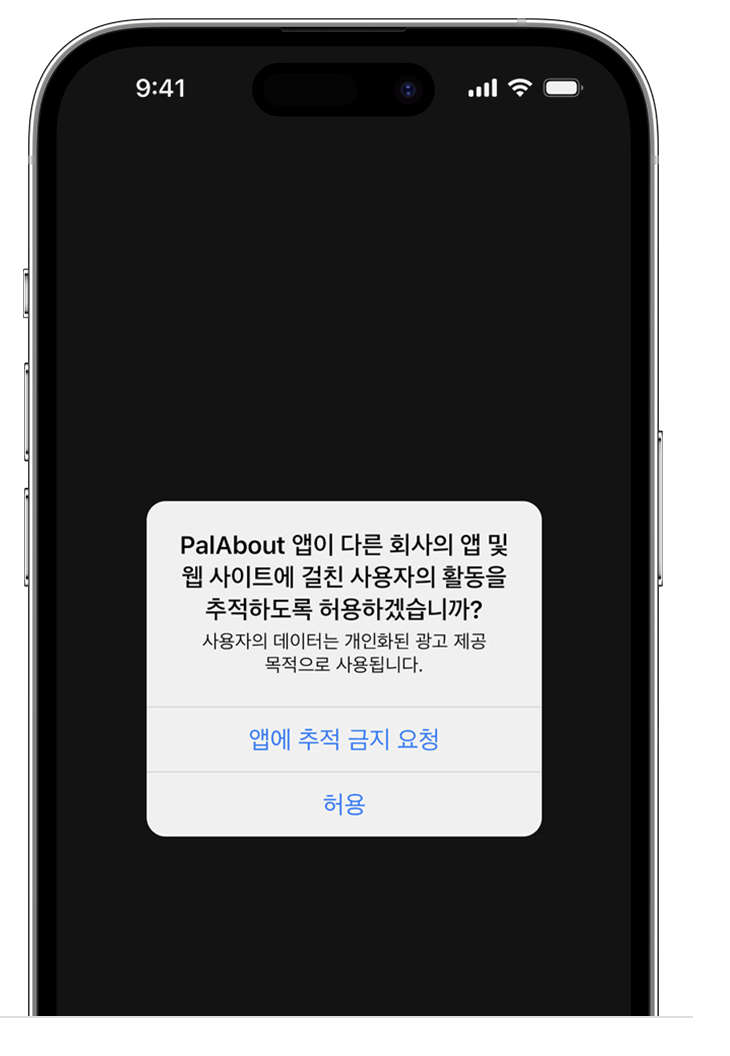
ios에서 앱을 실행하다보면 아래 이미지처럼 사용자 활동 추적 메시지를 본 적이 있을 것이다. 이 팝업이 뜨도록 설정하는 과정을 보도록 하자. react-native-permissions 패키지(https://www.npmjs.com/package/react-native-permissions)를 사용했다. 패키지 설명 페이지에 나온대로 따라해봤다.
1. Podfile 설정
1) react-native 버전에 따라서 아래 코드 Podfile에 추가
- react-native >= 0.72 일 때
def node_require(script)
  # Resolve script with node to allow for hoisting
  require Pod::Executable.execute_command('node', ['-p',
    "require.resolve(
      '#{script}',
      {paths: [process.argv[1]]},
    )", __dir__]).strip
end

node_require('react-native/scripts/react_native_pods.rb')
node_require('react-native-permissions/scripts/setup.rb')- react-native < 0.72 일 때
require_relative '../node_modules/react-native-permissions/scripts/setup'
2) 1에서 추가한 코드 아래에 다음 코드 추가
platform :ios, min_ios_version_supported
prepare_react_native_project!

setup_permissions([
  'AppTrackingTransparency'
])
2. Info.plist 설정
아래 코드 추가
<key>NSUserTrackingUsageDescription</key>
<string>사용자의 데이터는 개인화된 광고 제공 목적으로 사용됩니다.</string>
3. 변경 내용 적용
cd ios && pod install && cd ..
4. react native 코드 작성
import { check, request, PERMISSIONS, RESULTS } from 'react-native-permissions';

const requestAppTracking = async () => {
  const result = await check(PERMISSIONS.IOS.APP_TRACKING_TRANSPARENCY);

  if (result === RESULTS.DENIED) {
    // The permission has not been requested, so request it.
    request(PERMISSIONS.IOS.APP_TRACKING_TRANSPARENCY)
      .then((res) => console.log('res', res))
      .catch((error) => console.log(error));
  }
};
5. 끝!

https://support.apple.com/ko-kr/102420
앱이 사용자의 활동 추적을 요청하는 경우 - Apple 지원 (KR)
앱 추적 투명성 기능은 광고 제공 또는 데이터 브로커와의 공유를 목적으로 앱이 다른 회사의 앱 및 웹 사이트에서 사용자의 활동을 추적하도록 허용할지 사용자가 직접 선택할 수 있게 해줍니
support.apple.com
https://www.npmjs.com/package/react-native-permissions
react-native-permissions
An unified permissions API for React Native on iOS, Android and Windows. Latest version: 4.1.5, last published: 4 months ago. Start using react-native-permissions in your project by running `npm i react-native-permissions`. There are 339 other projects in
www.npmjs.com
'ReactNative' 카테고리의 다른 글
| [React Native] REALM Error: Accessing object which has been invalidated or deleted (0) | 2024.09.14 |
|---|---|
| [React Native] --list-devices에서 USB로 연결한 안드로이드 실기기가 보이지 않을 때 (0) | 2024.09.04 |
| [React Native] The Google Mobile Ads SDK was initialized without an application ID. (0) | 2024.07.31 |
| [React Native] MacOS 기기에서 현재 사용 가능한 시뮬레이터 목록 가져오기 (0) | 2024.07.18 |
| [React Native] 특정 Android 기기에서 프로젝트 실행하기 (0) | 2024.07.16 |



